Box model
The CSS Box Model is a fundamental concept that defines the layout and spacing of elements on a web page. It consists of content, padding, border, and margin. Here's an in-depth guide with code snippets and examples:
- Box Model Components
- Box Model Properties
- Box Sizing
- Shorthand for Margin, Border, and Padding
- Centering Elements
- Responsive Box Model
- Visibility
- Examples
Box Model Components
Content: The actual content of the box, where text and images are displayed.
Padding: A transparent area around the content, inside the border.
Border: A border surrounding the padding (if any).
Margin: Clears an area outside the border. It is transparent and does not have a background color.
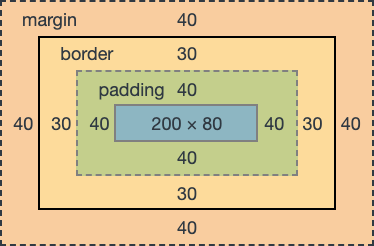
Box Model Properties
width and height
.box {
  width: 200px;
  height: 100px;
  border: 1px solid #333;
}
padding
.box {
  padding: 20px; /* Applies 20px padding to all sides */
}
.box {
padding-top: 10px;
padding-right: 20px;
padding-bottom: 15px;
padding-left: 5px;
}border
.box {
  border: 2px solid #333; /* Width, Style, Color */
}
.box {
border-top: 1px solid #ccc;
border-right: 2px dashed #555;
border-bottom: 3px double #777;
border-left: 4px solid #999;
}margin
.box {
  margin: 10px; /* Applies 10px margin to all sides */
}
.box {
margin-top: 5px;
margin-right: 15px;
margin-bottom: 10px;
margin-left: 0;
}Box Sizing
The box-sizing property controls how the sizing properties (width and height) apply to the total width and height of an element.
.box {
  box-sizing: border-box; /* Includes padding and border in the total width and height */
}
Shorthand for Margin, Border, and Padding
.box {
  margin: 10px;
  border: 1px solid #333;
  padding: 20px;
}
Centering Elements
Horizontally
.container {
  text-align: center;
}

.centered-box {
  display: inline-block;
}
Vertically and horizontally
.container {
  display: flex;
  align-items: center;
  justify-content: center;
}
Responsive Box Model
.box {
  width: 100%;
  max-width: 400px;
  margin: 0 auto; /* Center horizontally */
  padding: 20px;
  box-sizing: border-box;
}
Visibility
.hidden-box {
  display: none; /* Hide element */
}

.invisible-box {
  visibility: hidden; /* Element takes up space, but is invisible */
}
Examples
Example 1: Basic Box Model
<!DOCTYPE html>
<html lang="en">
<head>
  <meta charset="UTF-8">
  <meta name="viewport" content="width=device-width, initial-scale=1.0">
  <title>Box Model Example</title>
  <style>
    .box {
      width: 200px;
      height: 100px;
      padding: 20px;
      border: 2px solid #333;
      margin: 10px;
    }
  </style>
</head>
<body>
  <div class="box">Content</div>
</body>
</html>
Example 2: Centering Box
<!DOCTYPE html>
<html lang="en">
<head>
  <meta charset="UTF-8">
  <meta name="viewport" content="width=device-width, initial-scale=1.0">
  <title>Centering Example</title>
  <style>
    .container {
      display: flex;
      align-items: center;
      justify-content: center;
      height: 100vh;
    }

    .centered-box {
      width: 200px;
      height: 100px;
      background-color: #3498db;
      color: white;
      text-align: center;
      line-height: 100px;
    }
  </style>
</head>
<body>
  <div class="container">
    <div class="centered-box">Centered Box</div>
  </div>
</body>
</html>