Branches
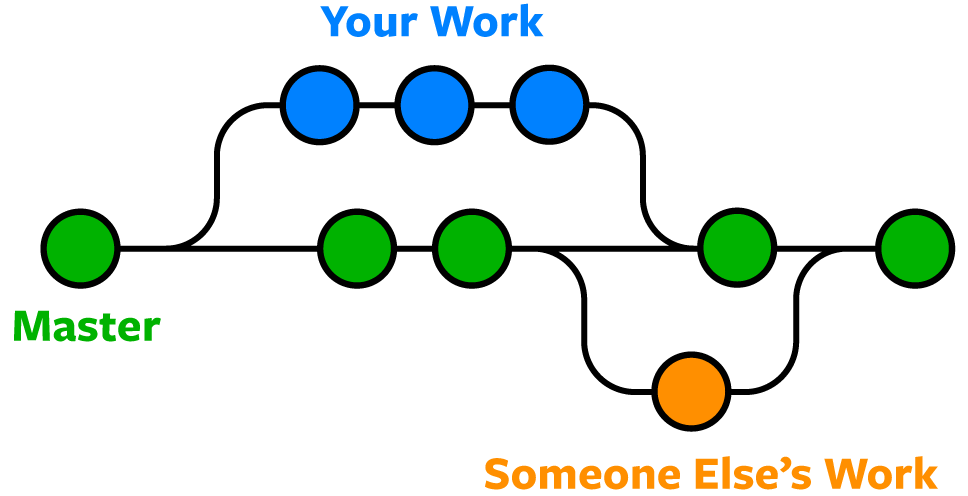
Git uses branching to allow you to work on multiple versions of a repository at the same time. You can think of a branch as a parallel universe of a repository. Changes you make in one branch do not affect other branches until you merge them back together.
You can visualise it like so:
Branching strategy
We use the following branching strategy:
developmentbranch: this is the branch where all the development happens. This is the branch where you should branch off from.featurebranch: this is a branch where you can work on a feature. This branch should be based on the development branch. When you are done, you can create a pull request to merge your branch into the development branch. Make sure to merge the development branch into your feature branch before creating a pull request to avoid merge conflicts. It's smart to create a pull request early on so that you can get feedback on your code.
Optional
We use DTAP to manage our environments as seperate branches. This means that we have a branch for each environment (Development, Test, Acceptance and Production). We use CI/CD to automatically deploy our code to the different environments. This means that when we push code to the development branch, it will automatically be deployed to the development environment. We use semantic versioning to manage our releases. Commits are analyzed to determine the next version number. This means that when we push code to the master branch, it will automatically be deployed to the test environment with the next version number.
Versioning
- fix(subject): commit -> will update the patch version
- feat(subject): commit -> will update the minor version
- breaking(subject): commit -> will update the major version
Semantic version looks as follows: MAJOR.MINOR.PATCH, e.g. 1.0.0
Handy definitions
git fetchcheck if there are any changes on the remote repository. This will not update your local repository.git checkoutonly checks out the local version of a branch, to update, also run git pull.git pullwill update your local repository with the latest changes from the remote repository.- A Pull request is a request to merge a branch into another branch. This is done to ensure that the code is reviewed before it is merged.
How to start developing
- Pull the latest version of the development branch. This determines where your branch will be based on. If you don't do this, you might have to resolve merge conflicts later on. You will miss the latest changes if you don't do this. You can also merge dev into your working branch in the meantime to get updates.
- Create a new branch from the development branch. The name of the branch should be the same as the Jira ticket number, e.g.
feature/DT-1234. - Work on your feature to finish it and commit your changes.
- Push your changes to the remote repository.
- Create a pull request to merge your branch into the development branch.
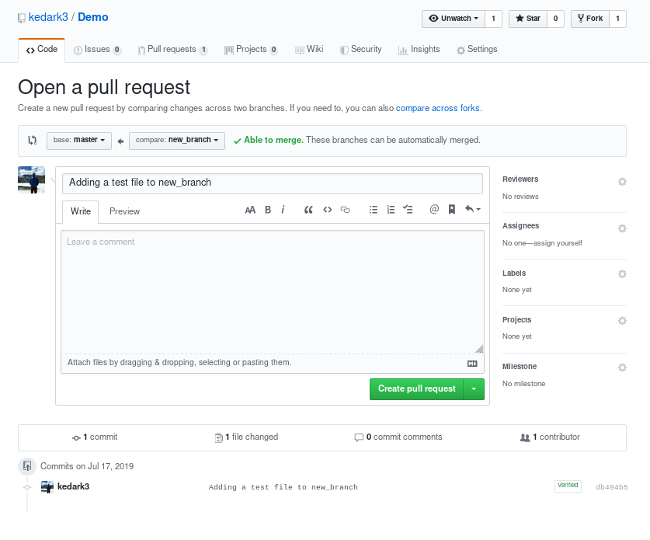
You can request a review from the repository admins. They will review your code and merge it into the development branch if it is approved.